If you’re choosing between A520, B550, and X570 chipsets in 2026, the short answer is: B550 is the right pick for most builds. A520 only makes sense for office PCs and basic Ryzen 3/5 systems where you’ll never overclock or upgrade. X570 is overkill unless you need multiple NVMe drives or are running a Ryzen 9 with heavy sustained workloads. The $40-60 gap between A520 and B550 buys you PCIe 4.0, real overclocking, better VRMs, and an upgrade path — and for any build above $700 total, that’s money well spent.
Quick Reference Guide
A520 Chipset — The Budget Option ($60-90)
The A520 chipset is AMD’s entry-level option for AM4 builds, launched in August 2020 as the successor to the A320. Boards typically cost $60-90, making it the cheapest path to a working AMD system.
What you get: PCIe 3.0 support, basic VRM (usually 4+2 or 6+2 phase), 1-2 M.2 slots at PCIe 3.0 speed, and full compatibility with Ryzen 3000, 4000G, and 5000 series CPUs (with BIOS update on older boards).
What you give up: No CPU or memory overclocking. No PCIe 4.0 — your GPU and NVMe drives run at PCIe 3.0 speeds even if they support 4.0. VRMs on most A520 boards are weak, so pairing one with a Ryzen 7 or Ryzen 9 will cause thermal throttling under sustained loads.
Best for: Office PCs, HTPCs, basic productivity builds, and gaming systems using Ryzen 3 or Ryzen 5 (non-X variants) with a mid-range GPU. If your total build budget is under $700 and you’ll never overclock, A520 saves you real money without hurting performance.
B550 Chipset — The Sweet Spot ($100-180)
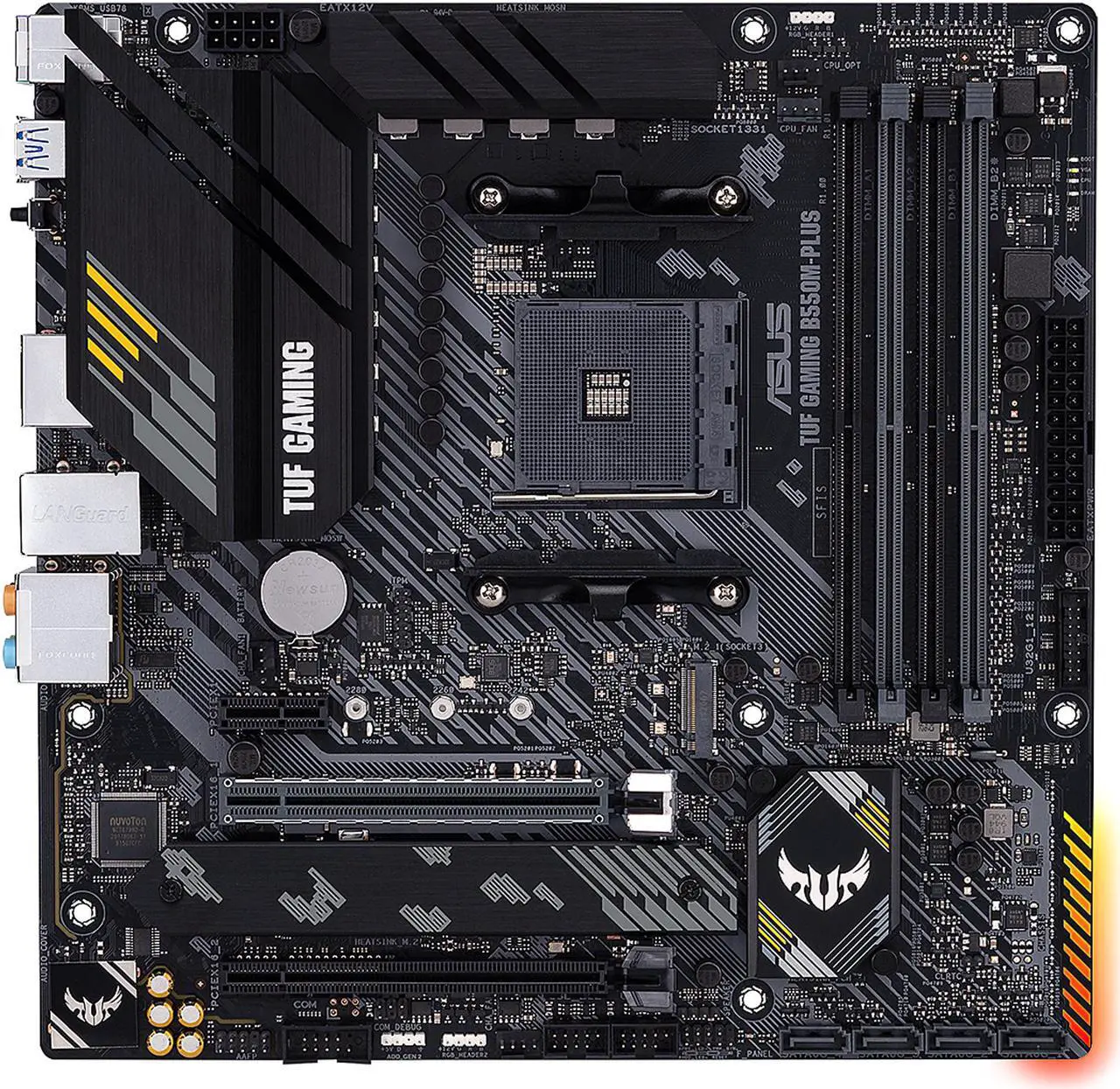
The B550 chipset launched in June 2020 and immediately became the value champion for AM4. Boards range from $100 to $180, and this is where the sweet spot lives for nearly every modern AMD build.
What you get: PCIe 4.0 on the primary GPU slot and main M.2 slot (huge for fast NVMe drives and future GPUs), CPU overclocking support, memory overclocking up to 4733 MHz+ on better boards, dual M.2 slots, and significantly stronger VRMs than A520. Most B550 boards have 8+2 phases or better, which handles any AM4 CPU without throttling.
What you give up vs X570: The chipset itself runs at PCIe 3.0 (the GPU and main NVMe slots are still PCIe 4.0 via the CPU). You get fewer total PCIe 4.0 lanes for secondary devices, which only matters if you’re running multiple NVMe SSDs or PCIe expansion cards.
Best for: Pretty much everyone. Gaming builds, productivity workstations, content creation rigs, Ryzen 5/7/9 systems — B550 handles all of it without compromise. The $40-60 premium over A520 is the best money you’ll spend on the build.
X570 Chipset — The Power User Pick ($170-400+)
X570 launched in July 2019 as AMD’s flagship AM4 chipset. Boards start around $170 and climb past $400 for high-end models. It was originally the only PCIe 4.0 option — a distinction that’s blurred since B550 added partial PCIe 4.0 support.
What you get: Full PCIe 4.0 across the entire chipset (not just CPU lanes), which means more PCIe 4.0 M.2 slots, more PCIe 4.0 expansion slots, and better connectivity for high-bandwidth devices. The VRMs on X570 boards are typically the strongest available on AM4 — ideal for Ryzen 9 5900X/5950X with sustained workloads. Most X570 boards include a small chipset fan for active cooling.
What you pay for: The chipset fan is the most visible downside — some boards run it audibly under load, which can be annoying in quiet builds. Premium pricing is the bigger issue: a $250 X570 board offers maybe 5-10% real-world advantage over a $130 B550 board for most users.
Best for: Ryzen 9 builds running sustained heavy workloads (video editing, 3D rendering, scientific computing). PC builders who want 2+ PCIe 4.0 NVMe drives in RAID. Workstation builds where you genuinely use multiple high-bandwidth expansion cards. If none of those describe your build, B550 saves you money with no real performance loss.
A520 vs B550 vs X570 Comparison Table
| Feature | A520 | B550 | X570 |
|---|---|---|---|
| Typical price range | $60-90 | $100-180 | $170-400+ |
| PCIe 4.0 on GPU slot | No (3.0 only) | Yes | Yes |
| PCIe 4.0 on M.2 | No (3.0 only) | 1 slot (CPU-wired) | Multiple slots |
| CPU overclocking | No | Yes | Yes |
| Memory overclocking | Limited | Yes (up to 4733+ MHz) | Yes (up to 5100+ MHz) |
| Typical VRM phases | 4+2 or 6+2 | 8+2 or higher | 10+2 or higher |
| Chipset fan | No (passive) | No (passive) | Yes (active) |
| USB ports | 8 total | 10 total | 12 total |
| SATA ports | 2-4 | 4-6 | 4-8 |
| Best CPU pairing | Ryzen 3 / Ryzen 5 (non-X) | Ryzen 5 / Ryzen 7 | Ryzen 7 / Ryzen 9 |
| Best for | Office, HTPC, budget gaming | Mainstream gaming, productivity | Workstations, heavy multi-NVMe builds |
Which Chipset Should You Buy? (Decision Guide)
Use this if/then logic to pick the right chipset for your specific build:
- Building an office PC, HTPC, or basic family computer under $600? → Go A520. Save the money for a better GPU or more RAM.
- Building a gaming PC with a Ryzen 5 5600/5600X and a budget under $700 total? → A520 works, but B550 gives you a clear upgrade path. Lean B550 unless you’re maxing out budget elsewhere.
- Building a Ryzen 5 or Ryzen 7 gaming/productivity rig in the $700-1500 range? → B550. This is its target audience. Don’t pay for X570.
- Using a Ryzen 5600G or 5700G APU? → B550 minimum — the APUs need strong VRM, which A520 can’t reliably provide. See our 5600G/5700G motherboard guide for specific picks.
- Running a Ryzen 9 5900X or 5950X? → X570, or a high-end B550 with strong VRM. For sustained workloads (rendering, simulation), X570 is the safer pick.
- Need 2+ PCIe 4.0 NVMe SSDs? → X570. B550 only gives you one PCIe 4.0 M.2 slot.
- Want absolute silence? → A520 or B550, both are passive. Many X570 boards have audible chipset fans under load.
When NOT to Buy Each Chipset
Knowing when to walk away from a chipset matters as much as knowing when to buy.
Don’t buy A520 if:
- You’re running a Ryzen 7 5800X or higher — the VRMs will throttle the CPU
- You’re using a Ryzen APU (5600G, 5700G) — same VRM problem, plus weaker iGPU performance
- You want a PCIe 4.0 GPU (RTX 4070+, RX 7700+) running at full speed
- You plan to upgrade your CPU within 2 years — you’ll quickly outgrow the board’s capabilities
- You want any meaningful overclocking, even just memory overclocking
Don’t buy B550 if:
- You’re running Ryzen 9 5950X under sustained 100% load — some B550 VRMs can throttle, X570 is safer
- You need 2+ PCIe 4.0 NVMe drives for RAID or heavy storage workloads
- You’re building a server or workstation requiring maximum PCIe 4.0 connectivity across multiple expansion slots
Don’t buy X570 if:
- Your build is under $1200 total — the money is better spent on GPU or RAM
- You’re using a Ryzen 5 — you can’t use the additional PCIe 4.0 bandwidth
- You want absolute silence and the board has a chipset fan (X570S boards solved this with passive cooling — worth checking)
- You don’t actually need multiple PCIe 4.0 NVMe drives or expansion cards
Frequently Asked Questions
Is A520 worth it over B550 in 2026?
Only for the most budget-constrained office or HTPC builds. For any gaming or productivity build above $700 total, B550 is worth the $40-60 premium because you get PCIe 4.0, CPU overclocking, stronger VRMs, and a real upgrade path. The cost savings of A520 are real but the trade-offs in capability are significant for any modern build that wants headroom.
What’s the main difference between A520 and B550?
Three things matter most: PCIe 4.0 support (B550 has it on GPU + main M.2; A520 doesn’t), overclocking (B550 supports CPU and memory overclocking; A520 doesn’t), and VRM quality (B550 boards have 8+2 phases or better; A520 boards typically have 4+2 or 6+2 with weaker heatsinks). The PCIe difference matters most for future GPU and NVMe upgrades.
Can I overclock on an A520 motherboard?
No CPU overclocking. AMD locks CPU overclocking on A520 chipsets at the chipset level — you cannot enable it regardless of which A520 motherboard you buy or which CPU you pair it with. Limited memory overclocking is possible on some A520 boards but typically capped at lower speeds than B550/X570. If overclocking matters at all, skip A520.
Do I need X570 for a Ryzen 7 or Ryzen 9?
For most Ryzen 7 CPUs (5700X, 5800X, 5800X3D), a quality B550 board with strong VRM handles them perfectly. For Ryzen 9 (5900X, 5950X) under sustained heavy workloads, X570 is safer because of better VRM cooling and more PCIe 4.0 lanes. For gaming-only Ryzen 9 builds, a high-end B550 is fine.
Will A520 limit my GPU performance?
For most current GPUs (RTX 3060, 3070, RX 6600, 6700), no — PCIe 3.0 vs 4.0 has minimal impact on gaming performance with these cards. For high-end PCIe 4.0 GPUs (RTX 4070+ or RX 7800+), you may see a 2-5% performance loss running at PCIe 3.0 speeds. The bigger issue with A520 is VRM limitations on the CPU side, not the GPU slot.
Does A520 support Ryzen 5000?
Yes, all current A520 motherboards support Ryzen 5000 series CPUs, though older boards may require a BIOS update before installation. However, A520 was designed for Ryzen 3 and lower-tier Ryzen 5 CPUs — pairing it with a Ryzen 7 5800X or Ryzen 9 means the weak VRMs will likely cause thermal throttling. Just because it’s compatible doesn’t mean it’s the right choice.
Is X570 still worth buying in 2026?
Yes, but only for specific use cases: workstations needing multiple PCIe 4.0 NVMe drives, Ryzen 9 builds running sustained heavy workloads (rendering, simulation), or builders who genuinely use multiple high-bandwidth expansion cards. For mainstream gaming and productivity, B550 offers 95% of the X570 experience at 60-70% of the price.
The Bottom Line
For 95% of AMD builders in 2026, B550 is the right choice. It hits the sweet spot of PCIe 4.0 support, overclocking, strong VRMs, and reasonable pricing. A520 saves money but limits your build’s capabilities and upgrade path. X570 is technically superior but only worth the premium for specific high-end workloads.
The simple rule: spend the $40-60 to step up from A520 to B550. Don’t spend the $80-150 to step up from B550 to X570 unless your specific workload demands it.
For specific motherboard picks, see our guides for the best B550 motherboards, best A520 motherboards, and best motherboards for the Ryzen 5600G/5700G APUs.