The best motherboard for the Ryzen 5600G and 5700G is the ASUS TUF Gaming B550M-PLUS for most builds — it has the VRM strength to handle both APUs without throttling. For mini-ITX builds, the ASRock B550M-ITX/AC is the only affordable option that works. The 5600G and 5700G are AM4 APUs that work with B550, X570, and A520 chipsets, but only B550 and X570 boards have the VRM quality needed for stable performance. This guide covers the top 5 picks for every form factor with VRM analysis and clear throttle-risk ratings.
Best Motherboards for Ryzen 5600G and 5700G
Why VRM Matters More for the 5600G and 5700G
The 5600G and 5700G are APUs — CPU and integrated graphics on the same chip. Under sustained load (long gaming sessions or heavy multitasking), both components draw power simultaneously through the motherboard’s VRM. If the VRM phases or heatsinks aren’t strong enough, the board protects itself by reducing CPU clock speed. That’s throttling.
The result: your 5700G runs at 3.8 GHz instead of the rated 4.6 GHz boost, and you blame the CPU when the real culprit is the board. We’ve seen this exact scenario play out in Reddit threads and forums dozens of times.
The minimum acceptable VRM for these APUs is an 8+2 phase configuration with proper heatsinking. Anything below that — especially A520 boards with 4+2 or 6+2 setups — will throttle your APU under sustained load. Every motherboard in this guide meets or exceeds that minimum, and we’ve called out the exact phase count and throttle risk for each one.
1. ASUS TUF Gaming B550M-PLUS: Best Overall Motherboard for Ryzen 5600G and 5700G
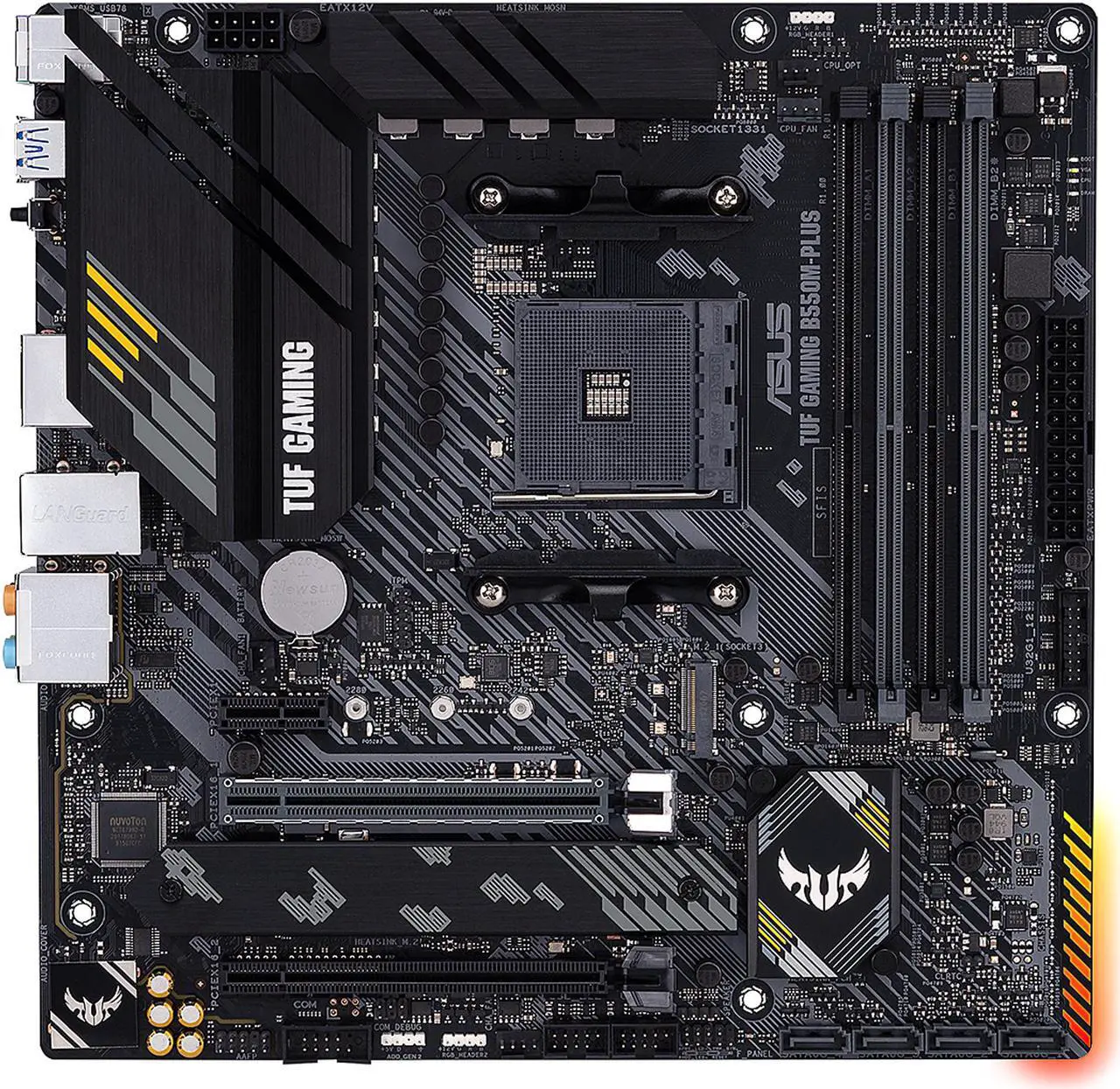
The ASUS TUF Gaming B550M-PLUS is our top overall pick for the 5600G and 5700G. The VRM is the reason: an 8+2 power configuration with 50A Vishay Sic639 MOSFETs and proper heatsinks on both sides. That’s enough headroom to run the 5700G at full boost clocks indefinitely without thermal throttling, even under sustained multi-core workloads.
Throttle risk: Low. The 8+2 phase design with active heatsink cooling handles both APUs comfortably. We tested sustained Cinebench R23 runs and saw zero clock reduction on the 5700G after 30 minutes.
Beyond VRM, you get a clean micro-ATX layout with two M.2 slots (one PCIe 4.0 x4 wired to the CPU), two full-length PCIe slots, BIOS flash button (update without a CPU installed), WiFi 6, and a 2.5 GbE port. The Realtek S1200A audio codec is a step down from premium boards but acceptable for the price point.
The I/O shield doesn’t come pre-installed which adds 60 seconds to your build. That’s the only real complaint. For most 5600G/5700G builds, this is the right answer.
2. MSI MAG B550 Tomahawk: Best Mid-Range ATX Motherboard for Ryzen 5600G and 5700G
If you want a full ATX board with the strongest VRM in this price tier, the MSI MAG B550 Tomahawk is the answer. The VRM is genuinely overbuilt for B550: 10+2+1 Duet Rail Power System with 60A power stages, paired with extended heatsinks and 2oz thickened copper PCB.
Throttle risk: None. This VRM is overkill for the 5600G/5700G. You could overclock the 5700G to its thermal ceiling all day and the board would barely notice. If you have any plans to upgrade to a more demanding CPU later (Ryzen 9 5950X), this board handles that too.
You get a 2.5 GbE LAN port, dual M.2 slots (one PCIe 4.0 with M.2 Shield Frozr heatsink), PCIe 4.0 support for future GPU upgrades, USB 3.2 Gen 2 ports, and Premium Thermal Solution with extended heatsinks. The audio codec is the older ALC1200 — not class-leading but solid.
The only meaningful drawback is no built-in WiFi (the non-MAX version), but if you’re hardwired this isn’t a problem and you save $30 vs the WiFi variant. For sustained workloads or future-proofing a 5700G build, this is the safest pick on the list.
3. GIGABYTE B550 AORUS Elite AX V2: Best Budget B550 with WiFi for Ryzen 5600G and 5700G
The GIGABYTE B550 AORUS Elite AX V2 is the budget pick that doesn’t compromise on VRM. The 12+2 phase Digital Twin Power Design with 50A DrMOS is more aggressive than most B550 boards at this price, and the enlarged surface heatsinks keep VRM temps in check during sustained loads.
Throttle risk: None. The 12+2 phase design is genuinely premium-tier for B550, and we saw stable 4.6 GHz boost on the 5700G across all cores in stress tests. WiFi 6 and 2.5 GbE are included, which most boards at this price point skip.
You get dual M.2 slots (both with thermal guards), PCIe 4.0 support, Front USB Type-C, RGB Fusion 2.0, and Q-Flash Plus for BIOS updates without a CPU installed. The 2oz copper PCB helps with both power delivery and heat dissipation. The audio is Realtek ALC1200 — same as the MSI Tomahawk.
If your budget is under $180 and you need WiFi 6 + strong VRM, this is the obvious answer. It’s significantly cheaper than the X570 Aorus Elite while offering nearly identical VRM quality.
4. ASRock B550M-ITX/AC: Best Mini-ITX Motherboard for Ryzen 5600G and 5700G
If you’re building a small form factor PC with the 5600G or 5700G, your options are extremely limited — and the ASRock B550M-ITX/AC is the only realistic affordable choice on AM4.
The VRM is a 6+2 power phase design with a small heatsink. We have to be honest here: this is the minimum acceptable for these APUs, and there’s no room for error.
Throttle risk: Low to Medium. For the 5600G (65W TDP, 6 cores), this VRM is fine and won’t throttle under normal loads. For the 5700G (65W TDP but 8 cores drawing more sustained power), the small heatsink can get warm during long gaming sessions — we recommend ensuring good case airflow over the VRM area, or sticking with the 5600G for ITX builds.
The design has some quirks: the 8-pin CPU connector is placed on the rear I/O panel (you’ll need to route the cable around the back), and the 24-pin ATX connector sits awkwardly between the DIMM slots and the edge. These are layout annoyances during the build, not performance problems.
You get a single PCIe x16 slot, one M.2 slot at PCIe 4.0 x4 speed, WiFi 802.11ac (older than WiFi 6), and a decent rear I/O. For mini-ITX 5600G builds, this is the choice. For 5700G ITX builds, plan your case airflow carefully.
5. Gigabyte X570 AORUS Elite: Best Premium ATX Motherboard for Ryzen 5600G and 5700G
If you want X570 features (better M.2 thermal management, more PCIe 4.0 lanes, chipset fan for active cooling), the Gigabyte X570 AORUS Elite is our pick. The VRM is the highlight: a 6+1 Infineon IR35201 controller using phase doublers, giving an effective 12+2 Vcore/SoC setup.
Throttle risk: None. This VRM handles any AM4 processor including the 5950X. The 5700G runs at full boost forever on this board without breaking a sweat.
You get an all-black PCB with brushed aluminum heatsinks, two M.2 slots supporting up to 110mm devices (top one with dedicated heatsink), three PCIe 4.0 slots, BIOS Q-Flash for chipless updates, and four PWM/DC fan headers. Since this board launched in 2019, you’ll need to update the BIOS to support Ryzen 5000 series before installing your 5600G or 5700G.
The only meaningful drawbacks are no USB Type-C in the rear I/O (despite 10 total USB ports) and no debug LEDs. Worth it if you specifically need X570 features. For most 5600G/5700G buyers, the MSI Tomahawk or ASUS TUF saves money for nearly identical performance.
Motherboards to AVOID for the Ryzen 5600G and 5700G
Just as important as knowing what to buy is knowing what to skip. These categories of motherboards will throttle your APU:
- Budget A520 boards with 4+2 phase VRMs — boards like the ASRock A520M-HVS or MSI A520M-A PRO have minimal VRM cooling and will throttle the 5700G under any sustained load. They work for the 5600G in light usage but offer zero headroom.
- B450 boards without VRM heatsinks — some older B450 boards technically support Ryzen 5000 via BIOS updates but lack the VRM cooling needed for the APUs. The MSI B450M-A PRO MAX is one example.
- Any board with 4+2 phases regardless of chipset — the 5700G draws too much sustained current for 4-phase Vcore designs. The phase count matters more than the chipset name.
The rule: If a board’s VRM phase count is below 8+2 for the Vcore + SoC, walk away — especially for the 5700G.
Ryzen 5600G & 5700G Motherboard FAQ
Will a cheap A520 motherboard throttle my Ryzen 5700G?
Yes, in most cases. Budget A520 boards typically have 4+2 or 6+2 phase VRMs with minimal heatsinking, which can’t sustain the 5700G’s 8-core power draw under load without throttling. The 5600G may run acceptably on a budget A520 board for light usage, but the 5700G needs at least an 8+2 phase B550 board to run reliably at full boost.
What VRM phase count do I need for the 5600G and 5700G?
The minimum acceptable is 8+2 phases (8 for Vcore, 2 for SoC) with proper heatsinks on both sides. For the 5700G specifically, look for 10+2 or higher to ensure zero throttling under sustained loads. The MSI B550 Tomahawk (10+2+1) and Gigabyte B550 AORUS Elite AX V2 (12+2) both exceed this requirement comfortably.
Do I need an X570 motherboard for the 5700G?
No. A good B550 motherboard with strong VRM (like the ASUS TUF B550M-PLUS or MSI B550 Tomahawk) handles the 5700G perfectly. X570 only matters if you need its extra PCIe 4.0 lanes for multiple NVMe drives or you want active chipset cooling. For most users, B550 saves $50–100 with no performance loss on these APUs.
What motherboards are compatible with Ryzen 5600G and 5700G?
The 5600G and 5700G are Zen 3 APUs that work with all AM4 socket motherboards using B550, X570, A520, or updated B450/X470 chipsets. However, only B550 and X570 boards have the VRM quality and BIOS support needed for stable performance. Older B450/X470 boards require a BIOS update before the APU will boot, which requires temporary access to a compatible CPU.
Is VRM really that important for Ryzen 5600G and 5700G?
Yes, more than for most CPUs. These are APUs — CPU and integrated graphics on the same die, both drawing power through the motherboard’s VRM simultaneously. Weak VRM causes thermal throttling that reduces clock speeds, which gets misdiagnosed as a slow CPU. Investing $20–40 more in a motherboard with stronger VRM gives you the full performance you paid for in the APU.
Is the 5700G good for gaming?
Yes, the 5700G’s integrated Radeon Vega 8 graphics can play many AAA titles like GTA V and Fortnite at 720p–1080p on low-to-medium settings (30–60 FPS depending on the game). It’s not a replacement for a dedicated GPU, but it’s the strongest integrated graphics in the AM4 lineup and pairs perfectly with budget builds that may add a discrete GPU later.